Showing posts with label Hacking Softwares. Show all posts

Sunday, September 26, 2010

StegoStick - Best Steganography Tool

StegoStick is a stenography tool that Hides any kind of file inside any BMP, JPEG, Gif image files, WAV Audio, AVI/MPEG Video or any Binary File and gives "Steg" as Output File containing hidden file.

But in the past  stenography session we use "S-tools"  tool which hides only text(.txt) file inside only(.bmp) file format but i designed this StegoStick to hide any format file inside any format file


ADVANTAGES

  • Supported for all format of files.
  • (NO DATA LOSS) THERE WILL NOT BE ANY PERCEPTIBLE DISTORTION IN THE CARRIER FILE AFTER HIDING.YOUR FILE WILL SEEM EXACTLY AS THE ORIGINAL, so it's  almost impossible to detect hidden data.
  • Platform independent.
  • Contains various Encryption algorithms.
To Download : http://mcaf.ee/35427

TO HIDE A FILE:

After downloading we have to open StegoStic.jar file from downloaded folder.Then select Hiding tab in the window displayed as shown below

Note : click images to view in large size
Then choose the Algorithm which is used to hide files or select default option and then click ok.
Then browse for the file which is to be hide .
In this demo i am going to hide a (.rar) file inside a (.mp4) file. So i select "pwaste.rar" file to hide.
Then Browse for the cover which act as a cover for the file to be hide.
As i told in the previous step my cover file is an (.mp4) file.So i select "NenjeNenjeBRRip]- Uyirvani.com.mp4".
Note : Memory of cover file must larger than the secrete file.

Then Browse for the output folder where output file in the name "steg" is to be create.
Then the password which is used to encrypt and decrypt the file to be hide.Then clock ok.
After a successful process a confirmation msg will show the status.

Finally the "pwaste.rar" hide inside "NenjeNenje[BRRip]-Uyirvani.com.mp4" and the final ouput as "steg.mp4" as shown below.

TO UN-HIDE A FILE

Run the same "StegoStick.jar" file and select "UnHiding" tab then select decryption algorithm which is used to encrypt the file .Then click ok
Then browse for the cover file which contains hidden file.
Select the output folder.

Then enter the password which is used to encrypt the hidden file.

After successful decryption a confirmation status message will displays.
Finally the original file will extracts like shown in the below.
ANALYSIS RESULT


No Memory Loss:
No Data Loss.


Hide your data protect form third parties................
Have a happy hacking..................


Thanks for reading my post if it's useful please post comments.

Tuesday, July 13, 2010

WIRESHARK (Protocol Analyser)

Description :

  • Wireshark is the world's foremost network protocol analyzer, and is the de facto standard across many industries and educational institutions.
  • Wireshark is a free and open-source packet analyzer. It is used for network troubleshooting, analysis, software and communications protocol development, and education.
  • Wireshark is software that "understands" the structure of different networking protocols.
To download:

http://www.filehippo.com/download_wireshark_32/7711/

Advantages:

* Deep inspection of hundreds of protocols, with more being added all the time
* Live capture and offline analysis
* Multi-platform: Runs on Windows, Linux, OS X, Solaris, FreeBSD, NetBSD
* Captured network data can be browsed via a GUI, or via the TTY-mode TShark utility
* The most powerful display filters in the industry
* Live data can be read from Ethernet, IEEE 802.11, PPP/HDLC, ATM, Bluetooth, USB,
* Coloring rules can be applied to the packet list for quick, intuitive analysis
* Output can be exported to XML, PostScript®, CSV, or plain text.

How to Use:

  • Download and install the software from the above URL , then run it it will opens like the below
  • Select the interface which protocols to be record as shown in the above based on your internet connection

  • After that it starts recording it show in the below.
  • To observe more details about a data packet you can use the following below options.


  • To filter the specify protocol use this..


These are basic options in this software but we can use this particular software for many things.....

Friday, June 11, 2010

Resource Hacker :

DECRYPTION:

A freeware utility to view, modify, add, delete and extract resources in 32bit Windows executable .Resource Hacker TM is a freeware utility to view, modify, rename, add, delete and extract resources in 32bit Windows executable and resource files (*.res). It incorporates an internal resource script compiler and decompiler and works on Win95, Win98, WinME, WinNT, Win2000 and WinXP operating systems.

TO DOWNLOAD:

http://www.soft32.com/Download/Free/Resource_Hacker_340/4-3568-1.html


Viewing Resources:

Cursor, Icon, Bitmap, GIF, AVI, and JPG resource images can be viewed. WAV and MIDI audio resources can be played. Menus, Dialogs, MessageTables, StringTables, Accelerators, Delphi Forms, and VersionInfo resources can be viewed as decompiled resource scripts. Menus and Dialogs can also be viewed as they would appear in a running application.

Saving Resources:

Resources can be saved as image files (*.ico, *.bmp etc), as script files (*.rc), as binary resource files (*.res), or as untyped binary files (*.bin).

Modifying Resources:

Resources can be modified by replacing the resource with a resource located in another file (*.ico, *.bmp, *.res etc) or by using the internal resource script compiler (for menus, dialogs etc). Dialog controls can also be visually moved and or resided by clicking and dragging the respective dialog controls prior to recompiling with the internal compiler.

Adding Resources:

Resources can be added to an application by copying them from external resource files (*.res).

Deleting Resources:

Most compilers add resources into applications which are never used by the application. Removing unused resources can reduce an application's size.

EXAMPLE : TO EDIT AN (.exe) FILE

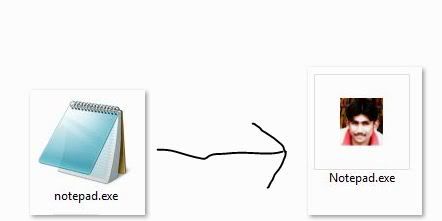
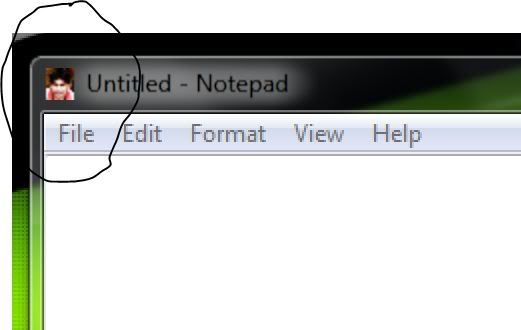
As we saw in the above we can extract .exe or .dll file to modify it .For example i changed a icon of notepad to my photo as shown in the below.


Step 1:

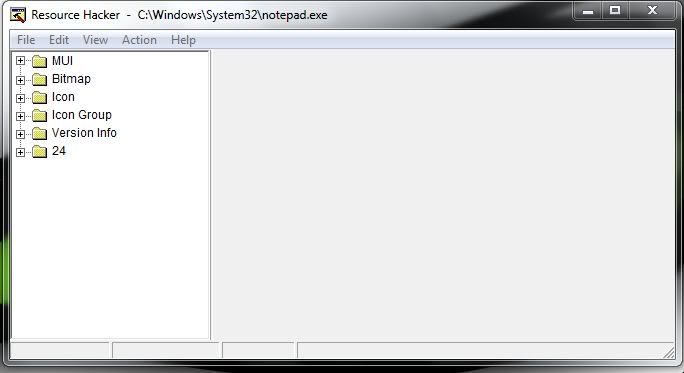
First we have to open the notepad.exe file from (C:\Windows\System32\notepad.exe) in our resource hacker software. Then it will be like this

Step 2:

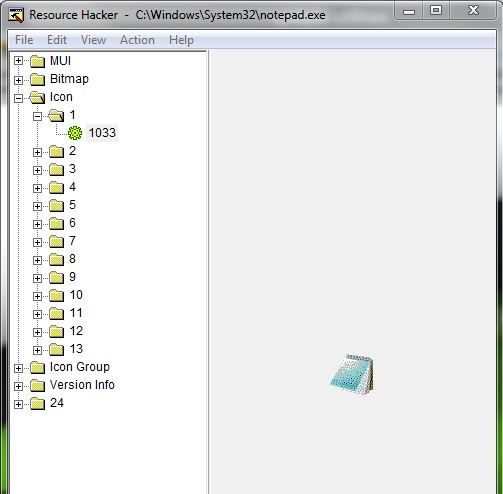
Then we have to expand the folders to find 1033 as shown in below.


Step 3:

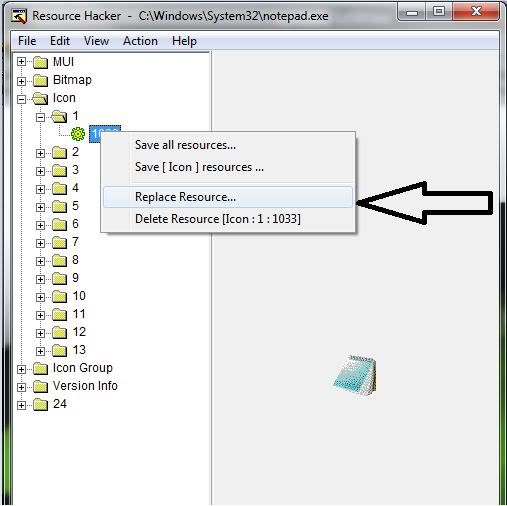
Then make a right click on this file to select Replace resource. As shown below.


Step 4:

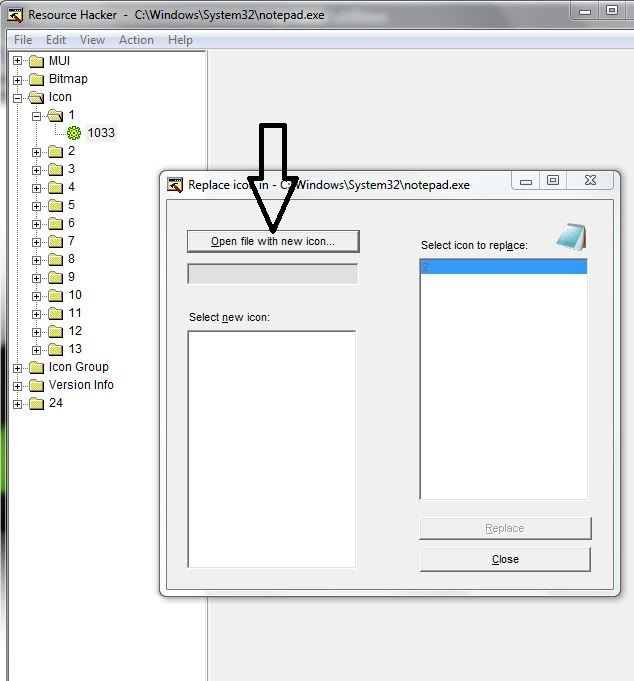
Then select open file with new icon.


Step 5:

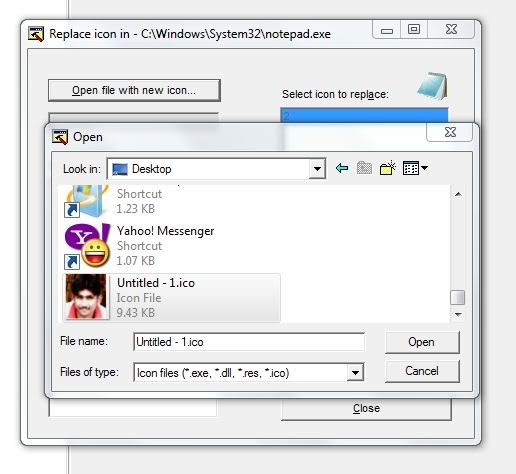
Then browse for your icon file (.ico) which is to replace instead of original file.


Step 6:

Then click Replace.

Step 7:

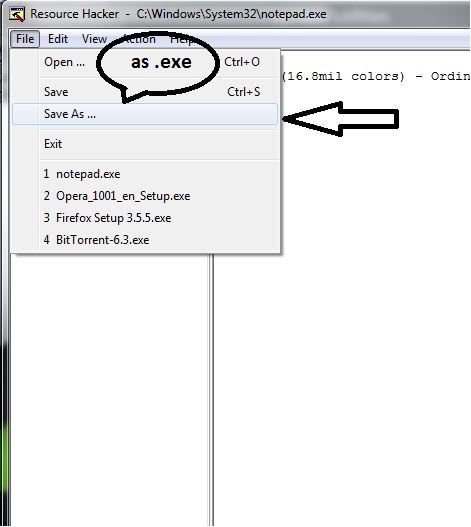
Then go to File->save as and save this file as new.exe .

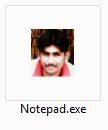
OUTPUT :


File looks as:


Saturday, June 5, 2010

TODAY’S SOFTWARE

S-tools:

DESCRIPTION:

S-Tools is a steganography tool that we can hides text files inside a picture or a sound file (BMP, GIF, and WAV).No one can trace it without correct authentication.

ADVANTAGES:

Data transaction becomes very secure.

Step’s to use it:

To download: http://www.cs.vu.nl/~ast/books/mos2/zebras.html

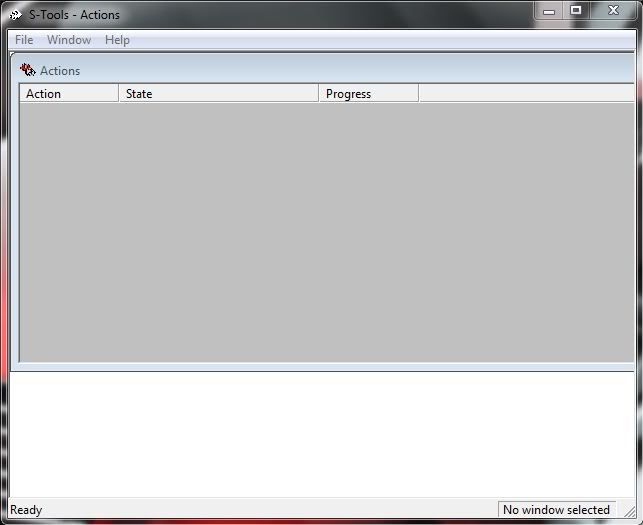
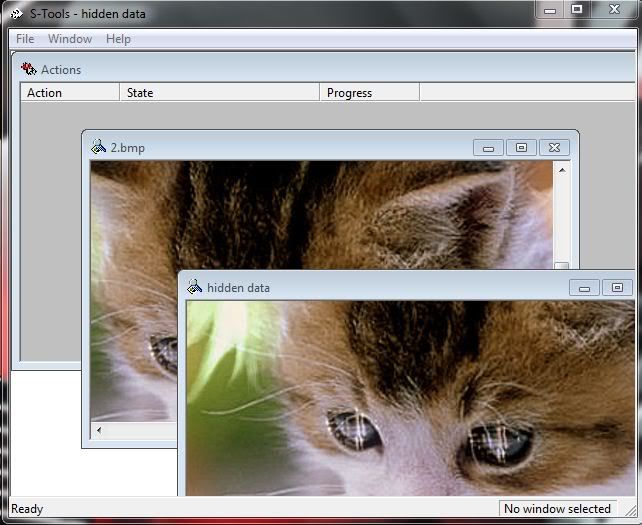
  • After installation run the s-tools.exe it will appears like the given below.
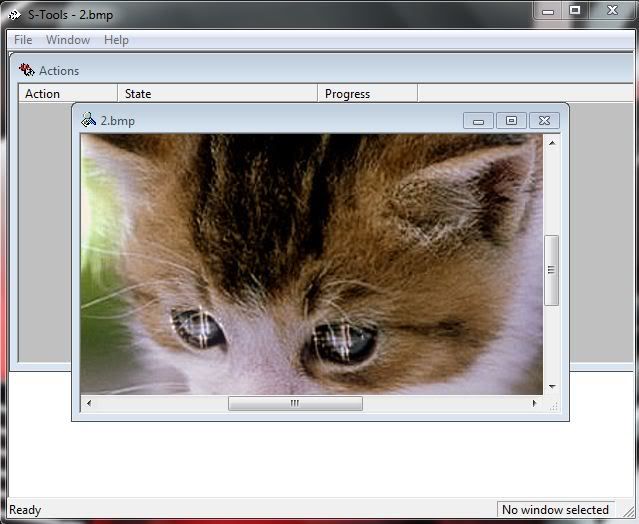
  • Then drag the image file (must be .bmp or .gif) which is used to hide your original text file. Then it will be like this.
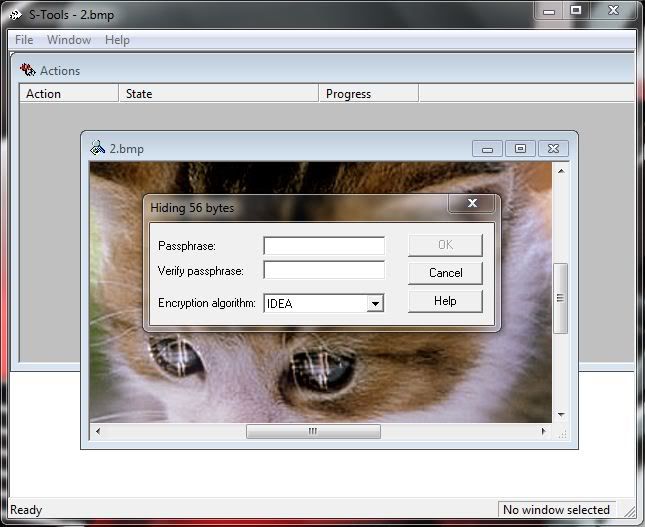
  • Then drag the text file (must be .txt) which we have to hide inside the image to that same window. Then it ask for PASSCODE to start encryption as shown in the below.
  • After entering the PASSCODE it encrypted the image with text and finally shows the stenography image.
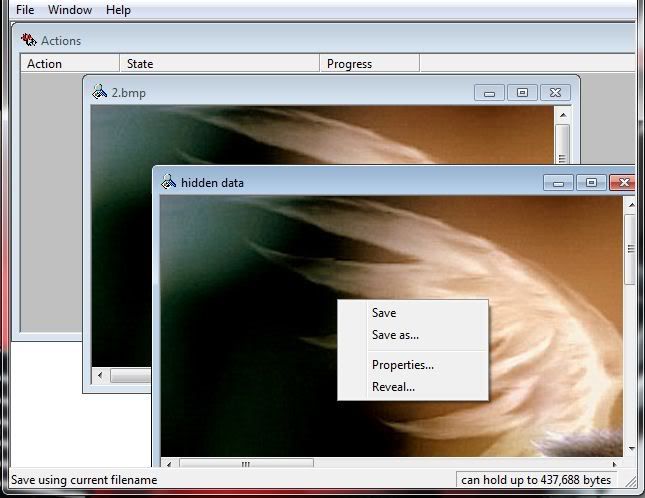
  • Then right click on the newly created image select SAVE AS and save that file with .bmp or .gif extension
  • Now a perfect steganography image is extracted. You can transfer your data safely.
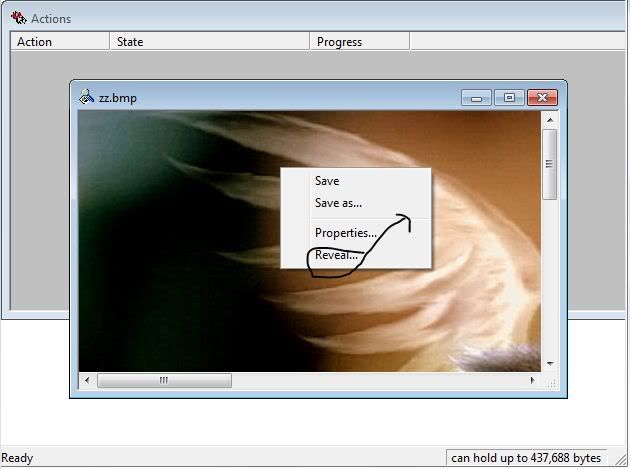
  • To decrypt or regain your original text.
  • Drag the encrypted file insid the window.
  • Make right click->reveal.
  • Enter the PASSCODE.
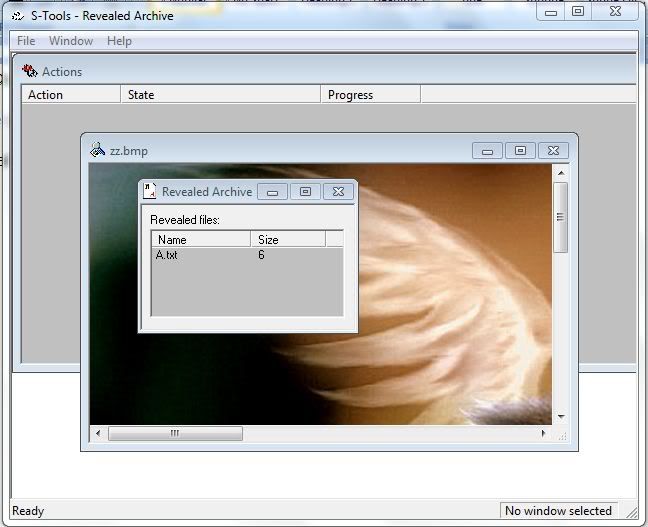
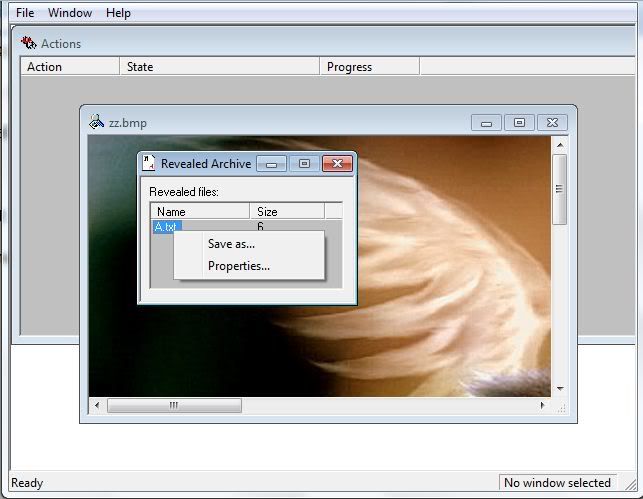
  • Then after decryption it shows the hidden text files inside the image.
  • Make a right click on the file txt file and save it to read original text.