Thursday, September 23, 2010

TRACE YOUR STOLEN LAPTOP

                                                                                          PREY

            Prey lets you keep track of your phone or laptop at all times, and will help you find it if it ever gets lost or stolen. It's lightweight, open source software, and free for anyone to use. Basically you install a tiny agent in your PC or phone, which silently waits for a remote signal to wake up and work its magic. This signal is sent either from the Internet or through an SMS message, and allows you to gather information regarding the device's location, hardware and network status, and optionally trigger specific actions on it.


ADVANTAGES

  1. Wifi autoconnect

  2. Light as a feather

  3. web cam to see your enemy

  4. Watch their movements, 100% geolocation aware

  5. Keep your data safe

  6. Full auto updater  


To Download : http://preyproject.com/download


NOTE : click images to view in large size


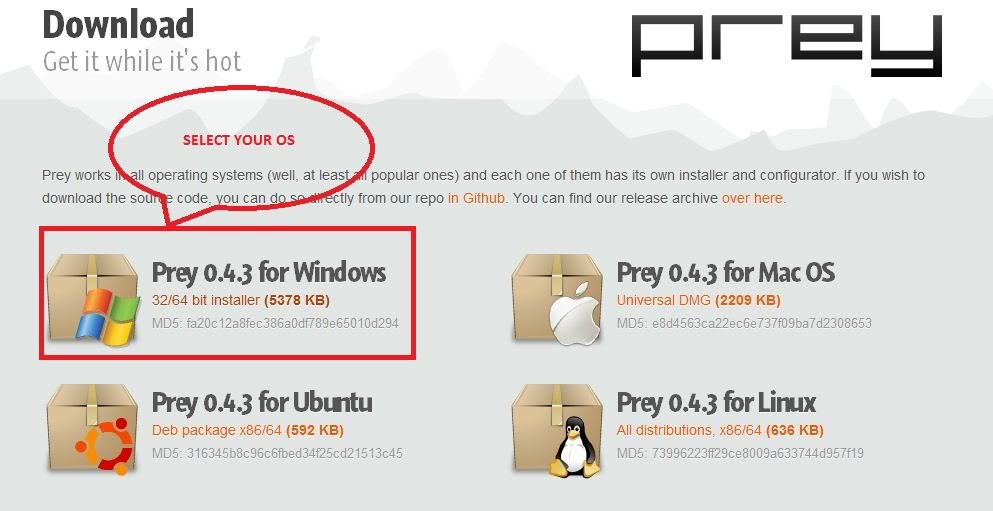
1.Download software from above link as shown below.Based on your operating system.


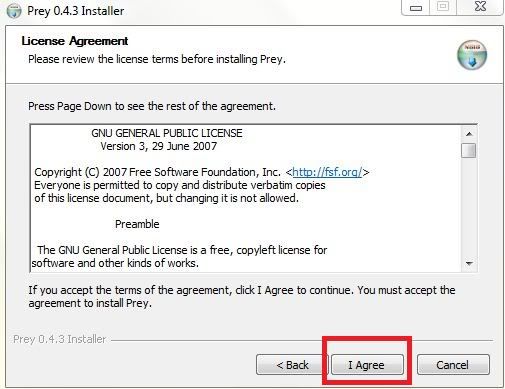
2.After a successful download install that software in your system.
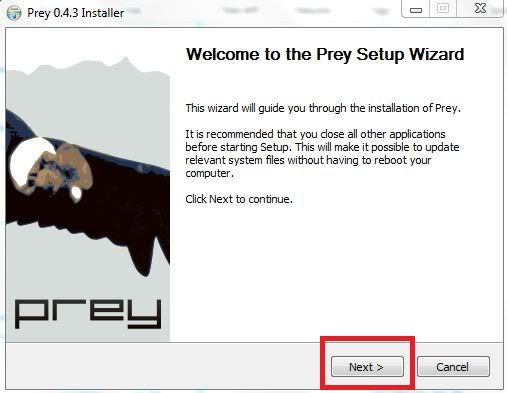


3.After a successful installation it will request you to configure Prey software.
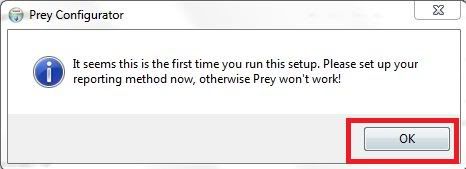


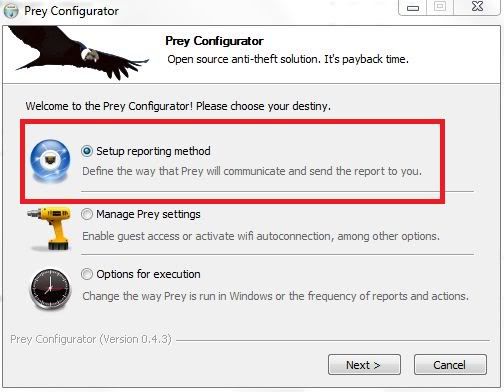
4.Then select "setup reporting method option".Then "next".


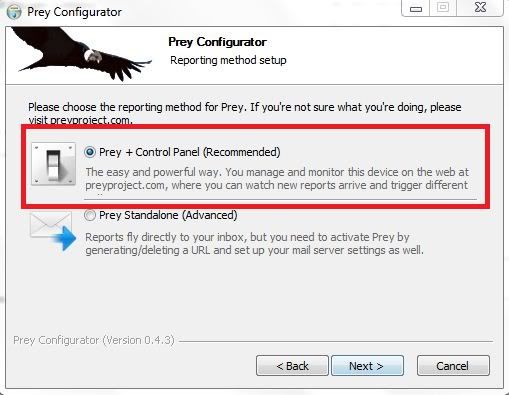
5.Then "prey + control panel " option.Then "next".


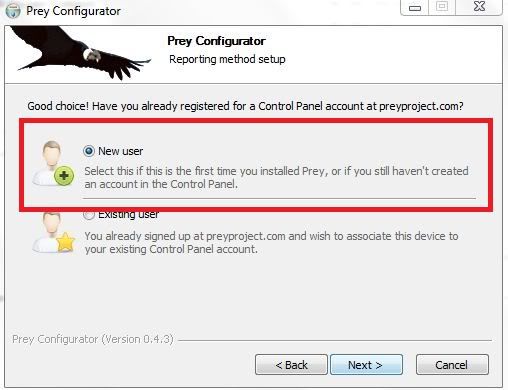
6.Then "new user"."next".


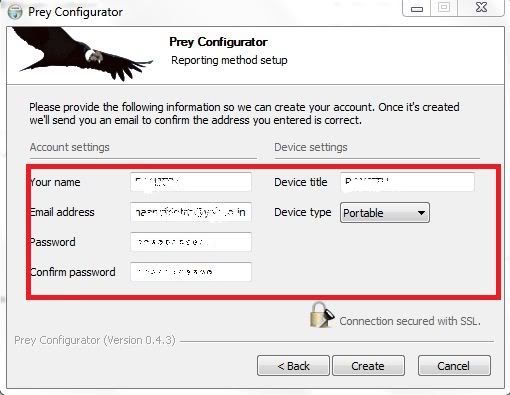
7.Register the account details which is used to login in to Prey website to trace back process.


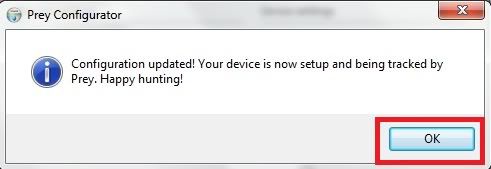
8.After a successful configuration a confirmation message will displayed. Then a confirmation e-mail will send to your inbox .


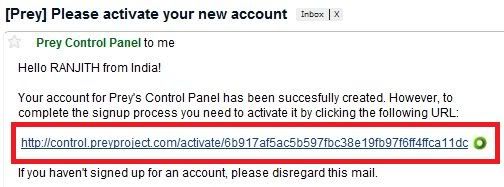
9.Browse your inbox for that confirmation messsage from Prey and click the URL.


10.Then login page will ask you to enter email address and password is already registered .
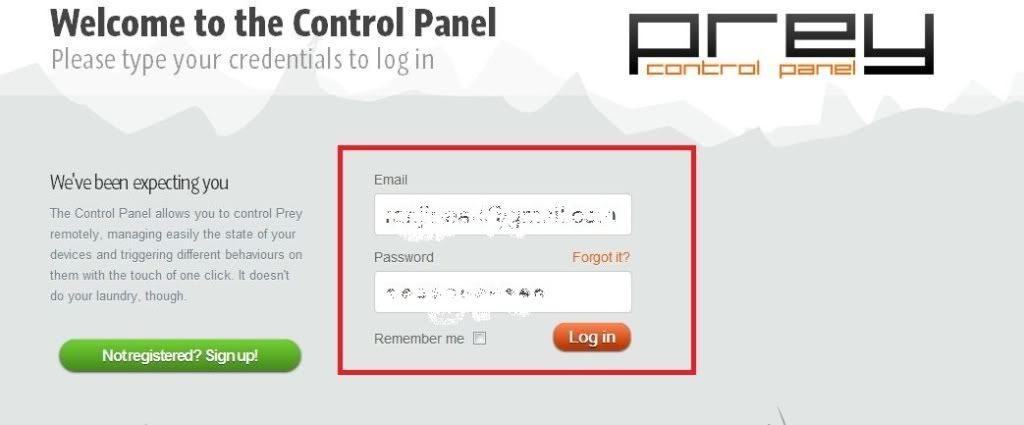


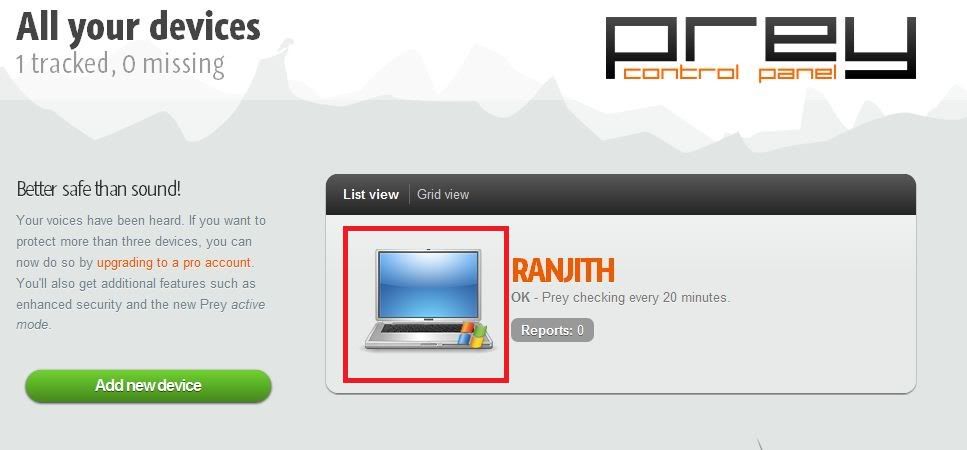
11.After a successful login it will show the device click it.


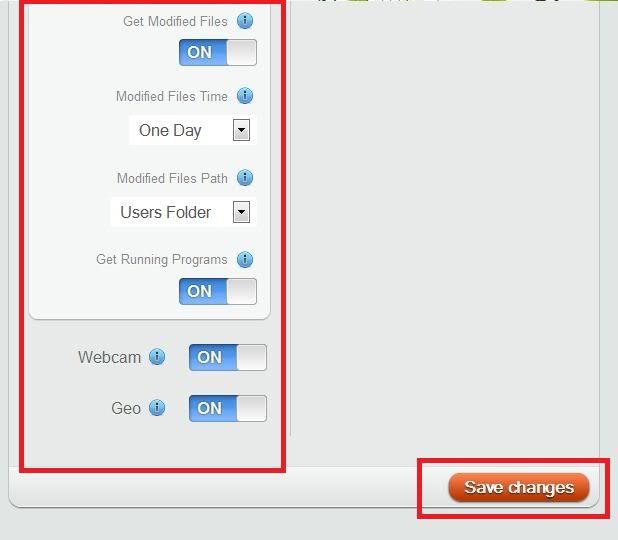
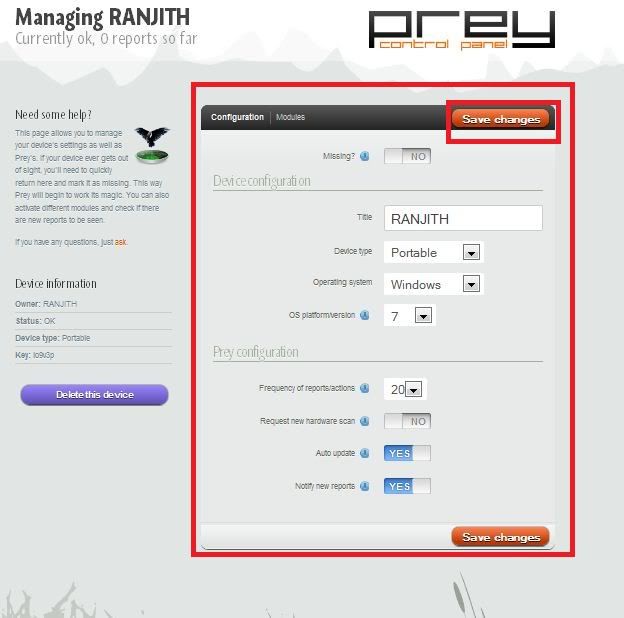
12.If necessary change the configuration of the Prey software.And "Save Changes".


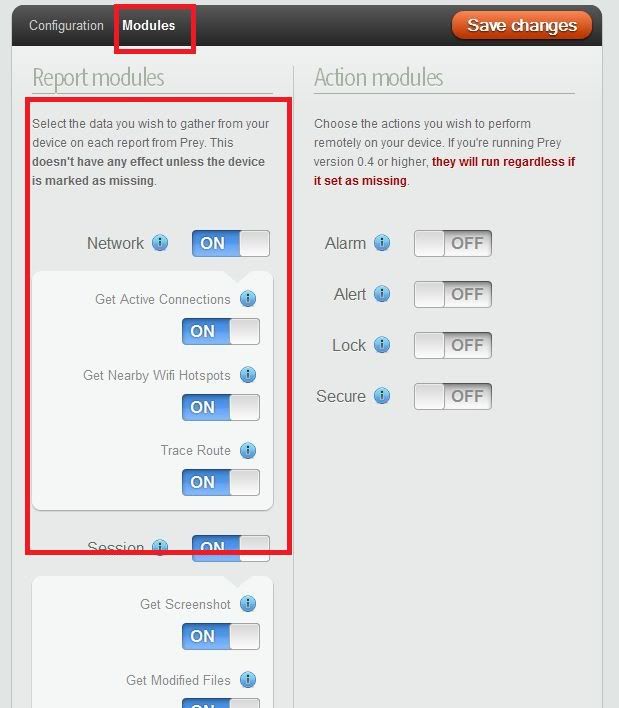
13.For ADVANCED SECURITY options click "modules" tab.Modify and save it.


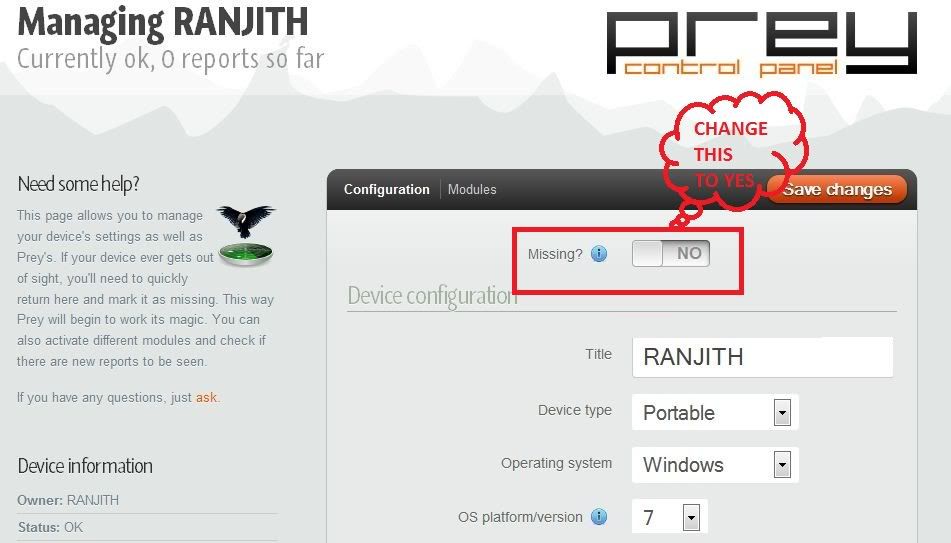
14.Now your lap is secured ,if your laptop become stolen just login your Prey account and change the "missing " option "no" to "yes".Then it automatically start hunting.......


Thanks for reading my post if it's useful please post comments.


Tuesday, September 21, 2010

Stellar Phoenix Windows Data Recovery Software v4.2

                      Stellar Phoenix Windows Data Recovery Software v4.2 for FAT & NTFS based partitions and volumes, is a comprehensive windows partition recovery solution for data loss due to partition corruption, partition resizing, file system damage, boot sector corruption, MBR damage, virus infection and human errors. Compatible with Windows 7.0, Vista, 2003, XP and 2000, the software comes with a host of features like partition recovery, email recovery, disk cloning, highly interactive user-interface, deep scan, raw recovery from CD and USB drives, and preview of lost files and folders. This partition recovery software is fully competent to recover data after any of these error messages:


  • "File not found"
  • "File is corrupted"
  • "Windows does not support this file type"
  • "Cannot access the file"
  • "File path not found"
  • "File error"
  • "Cannot perform the requested operation"
  • "This program is not responding"
  • "Unable to read file" 
                Note: Enable Deep Scan Option to Recover all possible data
 
          Stellar Phoenix Windows Data Recovery Software v4.2 is read only software that supports 185 popular file types including Windows NT Registry, JPEG, MP4, GIF, BMP and MS Word files. The software offers rich graphical support with self-descriptive user interface. The software incorporates advanced scanning methods to completely scan and recover lost data from your hard drive.


Recuva 1.38.504

Todownload : http://tinyurl.com/35392r5


          Recuva (pronounced "recover") is a freeware Windows utility to restore files that have been accidentally deleted from your computer. This includes files emptied from the Recycle bin as well as images and other files that have been deleted by user error from digital camera memory cards or MP3 players. It will even bring back files that have been deleted from your iPod, or by bugs, crashes and viruses!

  • Simple to use interface - just click 'Scan' and choose the files you want to recover
  • Easy to use filter for results based on file name/type
  • Simple Windows like interface with List and Tree view
  • Can be run from a USB thumb drive
  • Restores all types of files, office documents, images, video, music, email, anything.
  • Supports FAT12, FAT16, FAT32, exFAT, NTFS, NTFS5 , NTFS + EFS file systems
  • Restores files from removable media (SmartMedia, Secure Digital, MemoryStick, Digital cameras, Floppy disks, Jaz Disks, Sony Memory Sticks, Compact Flash cards, Smart Media Cards, Secure Digital Cards, etc.)
  • Restores files from external ZIP drives , Firewire and USB Hard drives
  • It's fast, tiny and takes seconds to run!


    To Download Another Collecttion of Data Recovery Tools:


    Thanks for reading my post if it's useful please post comments.

      Zemana AntiLogger 1.9.2.205

               Anti-Logger, developed to deal with different kinds of malware threats, protects your banking passwords, private emails & chat conversations from spying proactively without needing a signature-based algorithm and includes powerful, anti-action methods.AntiLogger prevents all known forms of malwares which intend to carry out information theft. As AntiLogger uses a proactive and a unique way to detect potentially harmful applications which have not already been recognized or identified by any anti-virus programs consequently, it protects your 'Information Security' from a range of threats.Modules: Anti-SSL Logger, Anti-WebCam Logger and Anti-ClipBoard Logger are the first security solutions developed in the world. Also, you will realize that these modules have the best features if compared to similar applications.Anti-KeyLogger Module provides a new powerful protection against keylogger's which have not been even caught by known, the most popular security softwares in the world.


      Here are some key features of "Zemana AntiLogger":

           · Anti-SSL Logger Module that provides protection against SSL Logger
           · Anti-WebCam Logger that provides protection against WebCam Logger
           · Anti-Key Logger Module that provides protection against Key Logger
           · Anti-Screen Logger that provides protection against Screen Logger
           · Anti-Clipboard Logger that provides protection against ClipBoard Logger
           · System Defence Module that protects your system

      Install Notes:

      1) Run installer AntiLogger_1.9.2.205.exe
      2) Run keygen to generate a valid serial.
      3) register the app with the serial


      Thanks for reading my post if it's useful please post comments.

      Steps to use WINDOWS 7 without activation for 1 year

      Windows 7Most of you might be aware of the fact that it is possible to use Windows 7 and Vista for 120 days without activation. This is actually possible using the slmgr -rearm command which will extend the grace period from 30 days to 120 days. However in this post I will show you a small trick using which it is possible to use Windows 7 without activation for approximately an year! Here is a way to do that.

      1. Goto “Start Menu -> All Programs -> Accessories” . Right click on “Command Prompt” and select “Run as Administrator“. If you are not the administrator then you are prompted to enter the password, or else you can proceed to step-2.

      2. Now type the following command and hit enter
      slmgr -rearm

      3. You will be prompted to restart the computer. Once restarted the trial period will be once again reset to 30 days. You can use the above command for up to 3 times by which you can extend the trial period to 120 days without activation.

      4. Now comes the actual trick by which you can extend the trial period for another 240 days. Open Registry Editor (type regedit in “Run” and hit Enter) and navigate to the following location

      HKEY_LOCAL_MACHINE\SOFTWARE\Microsoft\Windows NT\CurrentVersion\SoftwareProtectionPlatform

      5. In right-side pane, change value of SkipRearm to 1.

      6. Now you will be able to use the slmgr -rearm command for another 8 times so that you can skip activation process for another 240 days. So you will get 120 + 240 = 360 days of free Windows 7 usage.

      120 days using “slmgr -rearm” command before registry edit

      +                                                                                                                                                                 

      240 days using “slmgr -rearm” command after registry edit

       =      360 Days

      Thanks for reading my post if it's useful please post comments.

      Friday, September 3, 2010

      How to view USB history and delete them

                Well!! nowadays we use our USB port to plugin many devices like mp3 players,ipods,pendrives etc,it is also very true that these devices are also vector of  many viruses,trojans and backdoors etc which can be lethal sometimes.Today  I am  going to discuss how we can keep a track of  all the USB devices that  were connected to our computer(WIN Xp / 7 / Vista).This trick can be very helpful in case you find that some data has been stolen  from your PC.

      The USB history in a PC can be tracked by two methods:


                    a)By looking directly into the registry files.
                    b)Or by using Tool.


      Note:Click on the images to zoom them.

      Lets first start with Registry file method.

      1.First open up  Run and  type "regedit"  and hit enter.

      Note:USB history can be found at two places in registry

           --HKEY_LOCAL_MACHINE\SYSTEM\CurrentControlSet\Enum\USB
           --HKEY_LOCAL_MACHINE\SYSTEM\CurrentControlSet\Enum\USBSTOR


      2.A registry editor  window open up,in that window follow the steps as shown in the image below.
      (Here we will look into the second  registry path mentioned above but you can also try with the first one)
      In the above image you can see that after I connected a pendrive and its information is present there in the registry.

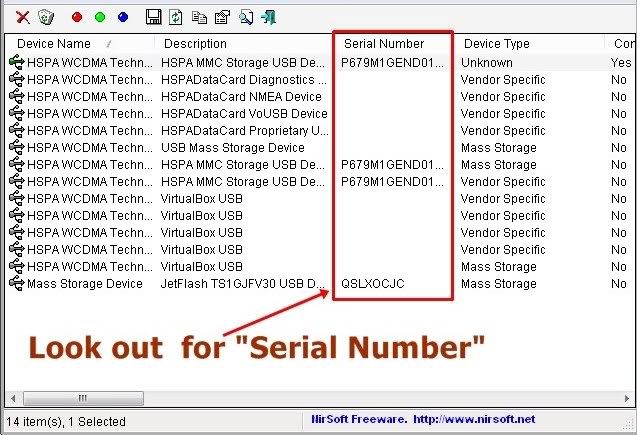
      So lets  see how we can do this with a tool.The tool that we will be using for this is Nirsofts's USBDVIEW. (Download)

      1.Download the Tool  and just run , it will show all the devices that were connected to your PC.


          Note:Serial numbers are  unique for external devices but internal devices as you can see have same serial number.


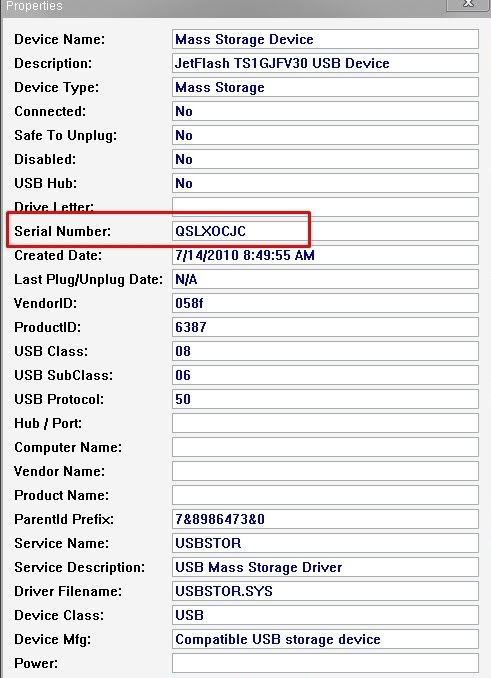
      2.Now select anyone of the external device and right click on it and select Properties.It will show you all the details about the external device as shown in the image below.


      Now we have retrieved the history of the USB  devices so,lets see how we can delete these history informations.

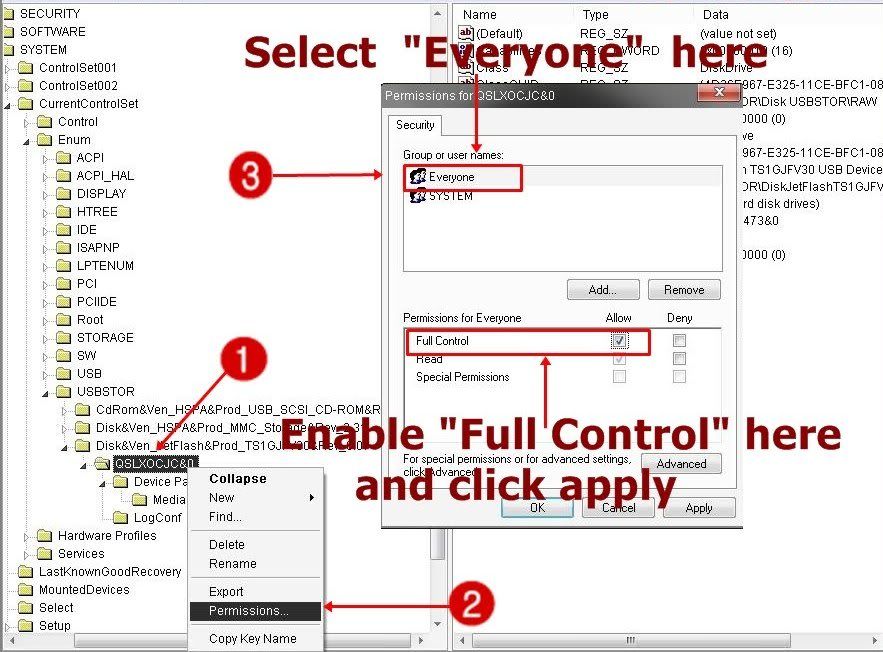
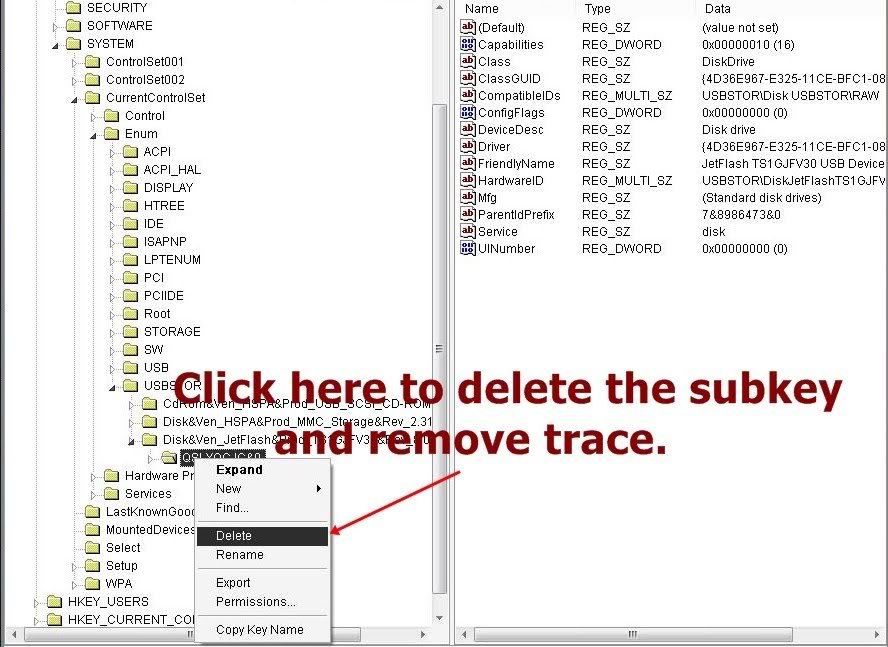
      1.Open up the registry editor window as shown in the above steps then follow the on screen steps as shown in the image below.


      2.After completing all the steps in the above image you will be able to delete the registry key or subkey.